
What Is AVIF Format and How to Use It

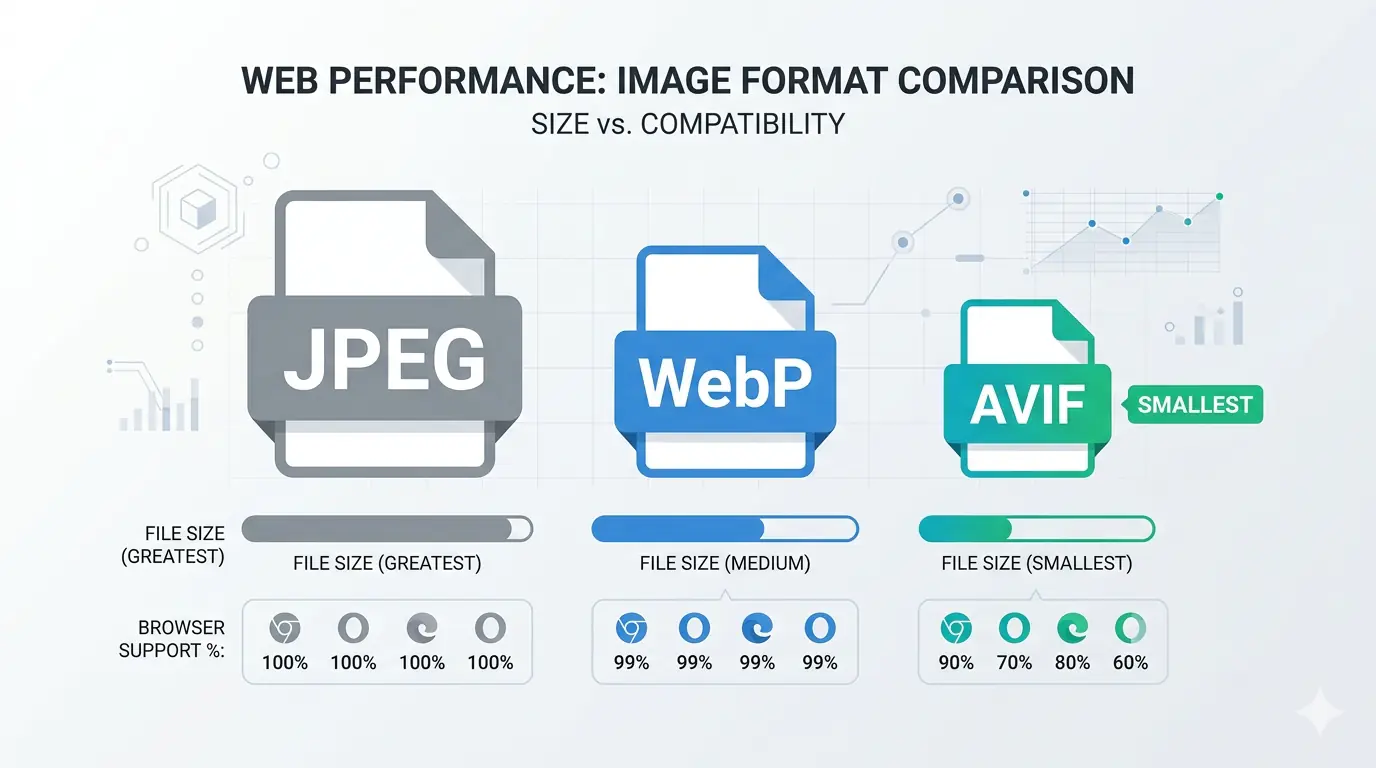
AVIF is a modern image format based on the AV1 video codec that achieves the best compression efficiency of any widely supported web image format in 2026. An AVIF image is typically 20–50% smaller than an equivalent WebP and 40–60% smaller than an equivalent JPEG at the same visual quality — making it the most powerful format upgrade available for website performance, Core Web Vitals, and image delivery.
If you have encountered .avif files and wondered what they are, why they exist, and whether you should be using them — this guide covers all of it: the technical foundation, the compression advantage, the current browser support picture, how AVIF compares to JPEG, and exactly how to convert images to AVIF today.
What Is AVIF Format? The Simple Explanation
AVIF stands for AV1 Image File Format. It is an image format derived from the AV1 video codec — a royalty-free video compression standard developed by the Alliance for Open Media, a consortium that includes Google, Apple, Mozilla, Netflix, Amazon, Microsoft, and Intel among its founding members.
The relationship between AVIF and AV1 video is direct: AVIF applies the same compression technology used to encode individual video frames to still images. AV1 was developed specifically to surpass the compression efficiency of its predecessor codecs — H.264 and H.265 (HEVC) — and the same efficiency advantage translates when applied to still image compression.
AVIF uses the .avif file extension and the MIME type image/avif. Like WebP, it supports both lossy and lossless compression, full alpha channel transparency, wide colour gamut, HDR (High Dynamic Range), and animation. Unlike WebP, it was designed from the ground up for the compression challenges of modern high-resolution photography and display technology — which is why it achieves higher compression ratios at equivalent perceptual quality.
The format is maintained by the Alliance for Open Media and is fully royalty-free — which resolved the licensing friction that slowed HEVC (H.265) adoption and prevented it from becoming a universal web format despite its technical superiority to JPEG.
Why AVIF Achieves Better Compression Than JPEG and WebP
To understand the AVIF compression advantage, it helps to understand why JPEG's compression is limited by design.
JPEG was standardised in 1992. Its compression algorithm divides an image into 8×8 pixel blocks, applies a Discrete Cosine Transform to each block, and discards the transformed data that contributes least to perceived visual quality. This block-based approach was designed for the hardware constraints of the early 1990s — it produces good results but has a structural ceiling on how much data it can remove before visible block artefacts (the characteristic blocky look of heavily compressed JPEGs) appear.
WebP's compression (derived from the VP8 video codec) improved on JPEG by using adaptive block sizes and prediction-based encoding — achieving 25–35% better compression than JPEG at equivalent quality. But VP8 itself was designed before AV1, and AV1's development incorporated years of additional research into perceptual quality modelling, transform coding, and entropy compression.
AVIF's compression advantage over JPEG and WebP comes from several AV1-inherited improvements:
Variable block sizes — AVIF can encode image regions in blocks ranging from 4×4 pixels to 128×128 pixels. Complex areas like faces or textures use small blocks for precision; flat areas like sky or background use large blocks for efficiency. JPEG's fixed 8×8 blocks cannot adapt this way.
More sophisticated intra-frame prediction — AVIF uses a larger set of directional prediction modes to model how pixel values relate to their neighbours. Better prediction means less data needs to be explicitly encoded — the decoder can reconstruct more from the prediction alone.
Superior entropy coding — AVIF uses a range coder rather than JPEG's Huffman coding, which achieves better compression of the remaining residual data after prediction.
Chroma from Luma (CfL) prediction — AVIF can predict colour channel values from luminance (brightness) values, reducing the data needed to represent colour information in natural images.
The combined result is that AVIF consistently achieves 40–60% smaller files than JPEG at equivalent visual quality across diverse real-world image content — photographs, graphics, illustrations, and mixed content.
AVIF Format in 2026 — Where Does It Stand?
The avif format 2026 landscape is significantly more mature than it was at AVIF's initial introduction. What was a forward-looking format two years ago is now a production-ready primary delivery format for modern web applications.
Encoding speed has improved substantially. Early AVIF encoding was notoriously slow — encoding a single high-resolution image could take seconds to minutes. Encoder improvements in libaom, SVT-AV1, and rav1e have reduced encoding times dramatically, and hardware acceleration for AV1 encoding is now available in modern CPUs and GPUs.
Toolchain support has expanded. Adobe Photoshop added native AVIF support in 2023. Lightroom added it in 2024. GIMP, Affinity Photo, and Figma all support AVIF. Most major CDNs (Cloudflare Images, Cloudinary, Imgix, BunnyCDN) support AVIF transformation and delivery.
The gap with WebP encoding speed remains the primary practical consideration for high-volume or real-time image processing. WebP encodes 3–5x faster than AVIF at equivalent quality settings, which matters for systems that process user-uploaded images on demand. For static publishing workflows where images are optimised once before upload — which is most blog, editorial, and marketing publishing — encoding speed is irrelevant to the end user.
AVIF Browser Support — The Current Picture
AVIF browser support in 2026 covers the vast majority of modern web traffic:
- Chrome: Full support since Chrome 85 (August 2020)
- Edge: Full support since Edge 121 (January 2024)
- Firefox: Full support since Firefox 93 (October 2021)
- Safari: Full support since Safari 16 (September 2022) — iOS 16 and later
- Opera: Full support since Opera 71 (2020)
- Samsung Internet: Full support since version 14 (2021)
- Chrome for Android: Full support
- Safari on iOS: Full support since iOS 16
Combined global AVIF browser support sits at approximately 93–94% of all web traffic in 2026. The remaining 6–7% consists primarily of older Safari versions (iOS 15 and below), legacy enterprise browsers, and devices that have not received software updates.
The practical implication of the 6–7% gap is that AVIF should not be served as a standalone format using a simple <img src="image.avif"> tag. It should be served using the HTML <picture> element with a WebP fallback — which ensures browsers that support AVIF get the most efficient format while those that do not receive WebP or JPEG:
<picture>
  <source srcset="image.avif" type="image/avif">
  <source srcset="image.webp" type="image/webp">
  <img src="image.jpg" alt="Descriptive alt text" width="800" height="600">
</picture>
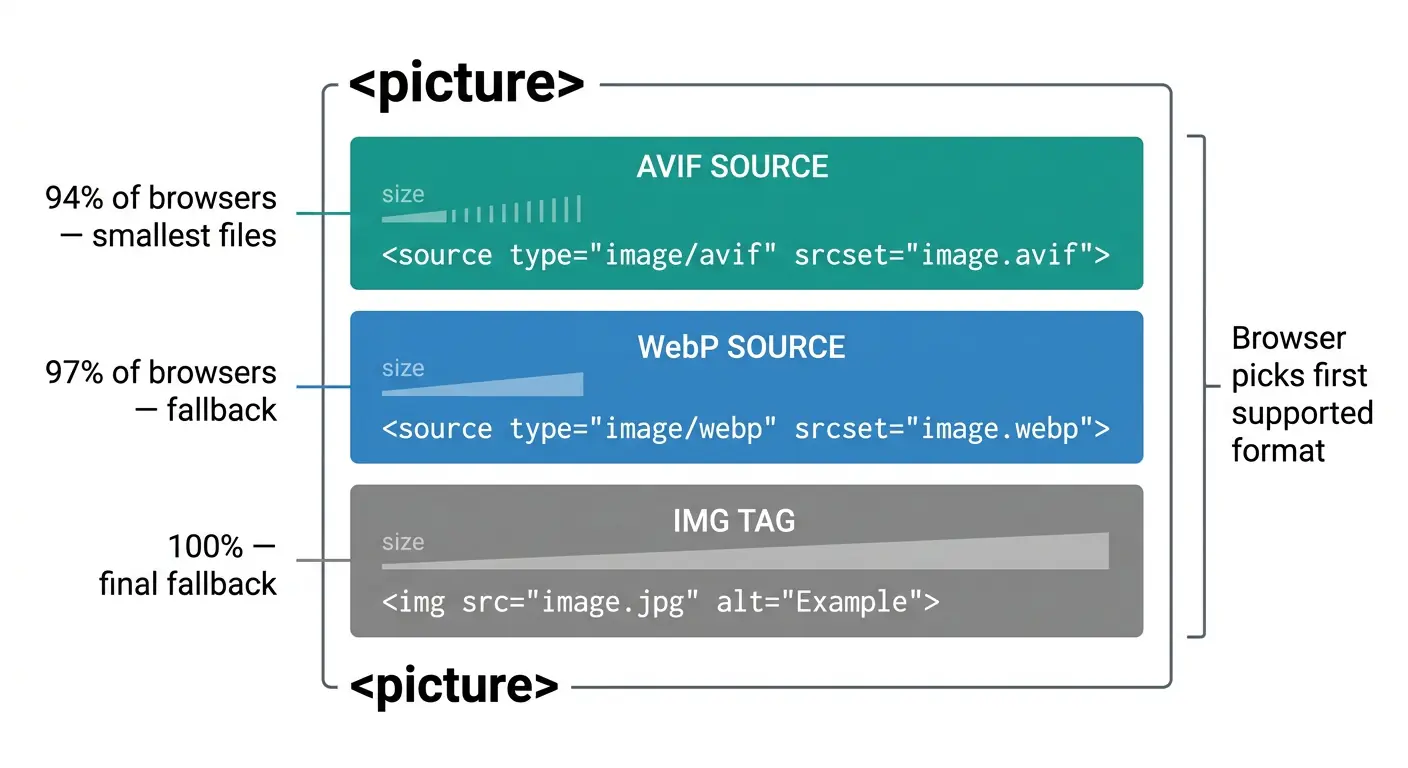 This three-level fallback delivers AVIF to ~94% of browsers, WebP to an additional ~3%, and JPEG to the remaining browsers — with no broken images and no server-side browser detection required.
AVIF vs JPEG — A Practical Comparison
The avif vs jpeg comparison is where the format's advantage is most clearly visible in real-world terms.
| Factor | AVIF | JPEG |
|---|---|---|
| File size (photographs) | 40–60% smaller | Baseline |
| File size (graphics) | 30–50% smaller | N/A (use PNG instead) |
| Transparency support | Yes — full alpha channel | No |
| Animation support | Yes | No |
| HDR support | Yes — 10-bit, 12-bit | No (8-bit only) |
| Wide colour gamut | Yes | Limited |
| Lossless mode | Yes | No |
| Browser support | ~94% global | ~100% |
| Encoding speed | Slower than JPEG | Fast |
| Editing software support | Growing (Photoshop, Lightroom, GIMP) | Universal |
| Email client support | Not supported | Universal |
The compression advantage is most pronounced for complex photographic content — faces, landscapes, product photography with fine detail. For simple graphics with flat colours, the advantage narrows but remains meaningful.
Where JPEG has no equivalent at all is in the quality ceiling. At very low bitrates — extreme compression for thumbnails, preview images, or bandwidth-constrained delivery — AVIF maintains perceptual quality where JPEG produces severe blocking artefacts. This is the encoding improvement most visible in side-by-side comparisons: at the same file size budget, AVIF looks significantly better than JPEG.
What Types of Images Benefit Most From AVIF?
Not all images benefit equally from AVIF conversion. Understanding where the advantage is largest helps prioritise which images to convert first.
Hero images and LCP candidates. The Largest Contentful Paint element on most web pages is a hero image. Reducing its file size by 40–60% compared to JPEG has a direct, measurable impact on LCP score and Core Web Vitals. Hero images are the highest-priority AVIF conversion target for any website.
Product photography. E-commerce product images are high-resolution, detail-rich photographs where AVIF's compression advantage is most pronounced. A product image gallery that loads 40–60% faster directly affects conversion rates and bounce rates.
Editorial and blog imagery. Featured images, in-content photographs, and editorial illustrations all benefit from AVIF's compression. A blog post that previously carried 1.5MB of image payload can carry 600–800KB of equivalent-quality AVIF images.
High-resolution background images. Full-width background images on landing pages and portfolio sites are often the single largest files on a page. AVIF compression applied here produces the largest absolute file size reductions.
Images where HDR or wide colour gamut matters. Photography platforms, art portfolios, and any site where colour fidelity is a differentiator benefit from AVIF's 10-bit colour depth and wide gamut support — capabilities that JPEG simply does not have.
Where AVIF is less critical: Simple flat-colour graphics like logos and icons are better served by SVG (vector format) regardless. Animated content may be better served by video for long animations. Email-embedded images must remain JPEG or PNG since email client AVIF support is not present.
How to Convert AVIF — Using MeloTools
How to convert avif is a practical question with several directions: converting from JPEG or PNG to AVIF, or converting from AVIF to a more compatible format for systems that do not yet support it.
Converting JPEG or PNG to AVIF
MeloTools image converter converts JPEG and PNG files to AVIF entirely in your browser — no file upload, no server, no account required. The conversion runs using the browser's built-in AVIF codec.
Specific conversion pages:
- JPG to AVIF — 40–55% smaller than JPG, best-in-class quality
- PNG to AVIF — dramatically smaller than PNG with full quality preservation
Converting from AVIF to compatible formats
For AVIF files that need to be shared with systems, applications, or recipients that do not support AVIF:
- AVIF to JPG — maximum sharing and editing compatibility
- AVIF to PNG — lossless output with full transparency support
- AVIF to WebP — broader tool compatibility while remaining a modern format
All MeloTools conversions run locally in your browser using the built-in codec. Files never leave your device — you can verify this by watching the Network tab in browser DevTools during conversion. No upload requests appear because no upload occurs.
AVIF vs WebP — Which Should You Use?
This question comes up whenever the avif file format explainer conversation reaches the practical decision point. The short answer for most sites in 2026 is: serve AVIF with WebP as the fallback.
AVIF produces better compression than WebP — typically 20–50% smaller at equivalent quality. If a browser supports both, AVIF is the better choice. But WebP has three practical advantages that make it the better fallback and in some contexts the better primary format:
Encoding speed. WebP encodes significantly faster than AVIF. For systems that generate images dynamically or process user uploads in real time, AVIF encoding latency can be a constraint that WebP does not have.
Toolchain universality. WebP support in design tools, CMS plugins, CDN transformation APIs, and image processing libraries is more complete than AVIF. If your workflow involves multiple systems, WebP is less likely to encounter a compatibility gap.
Broader support window. WebP's ~96–97% global support versus AVIF's ~93–94% means a slightly smaller fallback burden when using WebP as the primary format. For sites where every percentage point of global reach matters, this 3% difference can be relevant.
The recommended stack for 2026 is AVIF first, WebP fallback, JPEG final fallback — exactly as shown in the <picture> element example above. For a complete format comparison covering all four main formats, the best image format for web in 2026 guide covers every scenario with specific benchmarks. For a detailed head-to-head between AVIF and WebP specifically, AVIF vs WebP: Which Image Format Should You Use? covers the comparison across eight dimensions.
Can You Open AVIF Files on Your Computer?
Opening AVIF files on a desktop operating system depends on the OS version and installed software:
Windows: Windows 11 Photos supports AVIF natively. Windows 10 requires the AV1 Video Extension from the Microsoft Store (free) to view AVIF files in Photos. Chrome, Edge, and Firefox display AVIF files when dragged directly into a browser tab.
macOS: macOS Ventura (13.0) and later support AVIF in Preview and Quick Look. Earlier macOS versions require a third-party viewer or a browser tab.
Linux: Most modern Linux distributions support AVIF in GNOME Image Viewer, Eye of GNOME, and other image viewers that use the gdk-pixbuf library with AVIF support compiled in. GIMP with the avif plugin handles AVIF on all Linux distributions.
For any platform where native AVIF viewing is unavailable, the simplest solution is to drag the AVIF file into a Chrome or Firefox browser tab — both display AVIF files natively. For files that need to be edited in software that does not yet support AVIF, convert to PNG or JPEG using MeloTools AVIF to JPG converter first.
Frequently Asked Questions
What does AVIF stand for?
AVIF stands for AV1 Image File Format. It is an image container format that uses the AV1 codec — a royalty-free video compression standard developed by the Alliance for Open Media — applied to still image encoding. The Alliance includes Google, Apple, Mozilla, Netflix, Amazon, Microsoft, and Intel as founding members.
Is AVIF better than WebP?
AVIF achieves better compression than WebP — typically 20–50% smaller files at equivalent visual quality. AVIF also supports wider colour gamut and HDR, which WebP does not. WebP encodes faster and has slightly broader browser support (~97% vs ~94%). For static web publishing, AVIF is the better delivery format. For real-time image processing, WebP's encoding speed may be the deciding factor.
Is AVIF supported in all browsers?
AVIF has approximately 93–94% global browser support in 2026. It is supported in Chrome, Edge, Firefox, Safari (16+), and Samsung Internet. The remaining 6–7% — primarily older iOS devices on iOS 15 and below and legacy enterprise browsers — receive WebP or JPEG fallbacks when AVIF is served via the <picture> element.
How do I convert an image to AVIF?
Use MeloTools image converter — select JPG to AVIF or PNG to AVIF, drag your image, download the converted AVIF file. Conversion runs entirely in your browser with no file upload. For converting from AVIF to other formats, use AVIF to JPG, AVIF to PNG, or AVIF to WebP on the same converter hub.
What is the difference between AVIF and JPEG?
AVIF produces files 40–60% smaller than JPEG at equivalent visual quality. AVIF also supports transparency (JPEG does not), lossless compression (JPEG does not), HDR and wide colour gamut (JPEG does not), and avoids JPEG's characteristic block artefacts at high compression levels. JPEG has near-universal support including email clients and legacy systems — AVIF does not. JPEG remains the correct format for email delivery and external sharing to unknown systems.
Does converting to AVIF reduce quality?
Lossy AVIF conversion at quality settings equivalent to JPEG quality 80 produces output that is visually indistinguishable from the original at normal display sizes. The compression algorithm discards data below the threshold of human visual perception. Lossless AVIF conversion is pixel-identical to the source with no quality reduction. For a detailed explanation of the quality tradeoffs across all format conversions, the complete guide to image compression without quality loss covers the full framework.