
Best Image Format for Web: AVIF, WebP, PNG or JPEG in 2026

Introduction
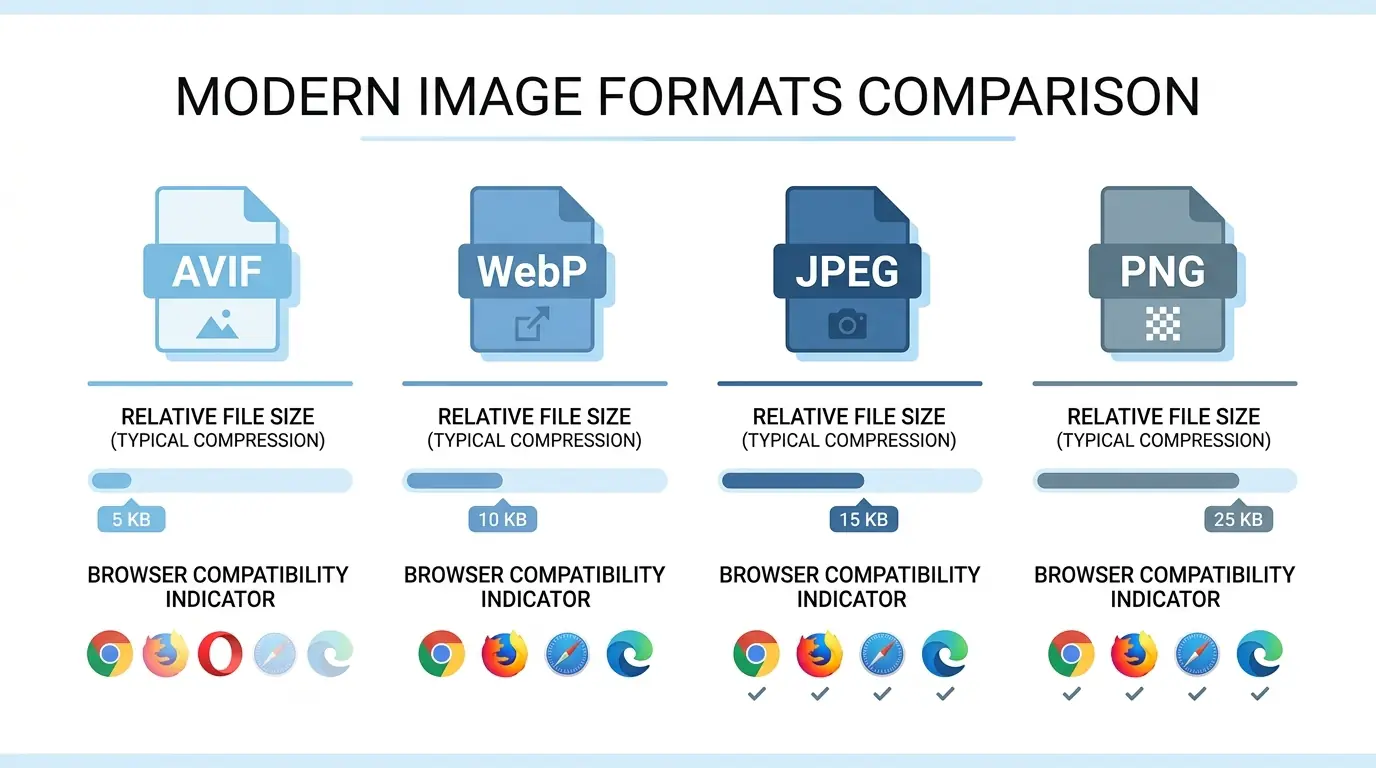
Choosing the best image format for web in 2026 is not as simple as it used to be. For years, the answer was JPEG for photos and PNG for graphics. That default has broken down. Four formats now compete for different roles on a modern website, and picking the wrong one for the wrong content type costs you in file size, load time, and search visibility.
This guide gives you a complete image format comparison across web performance, file size, browser support, and use cases — so you can make a confident format decision for every image on your site.
What Has Changed About Image Formats in 2026?
The web performance landscape shifted significantly over the past few years. Google's Core Web Vitals became ranking signals, with Largest Contentful Paint (LCP) directly tied to how fast your largest above-the-fold image loads. At the same time, browser support for modern image formats matured to the point where AVIF and WebP are now production-ready across essentially all modern devices.
The result is that the webp vs avif vs png vs jpeg question is no longer theoretical — it has real, measurable consequences for page speed, SEO rankings, and user experience. Modern image formats web developers adopt today directly determine Core Web Vitals scores tomorrow.
The four formats you need to understand are JPEG, PNG, WebP, and AVIF. Each serves a distinct purpose, and the best performing websites use all four intentionally rather than defaulting to one across the board.
JPEG: Still the Baseline for Photographs
JPEG has been the dominant format for photographic content since 1992. It uses lossy compression to reduce file size by permanently discarding visual data the human eye is least sensitive to — fine gradients, colour transitions in complex scenes, and subtle tonal shifts.
For photographs served to the broadest possible audience, JPEG remains a valid baseline format. It loads on every browser, every device, every email client, and every application. That universal compatibility has value in specific contexts.
The problem with JPEG in 2026 is efficiency. A photographic JPEG saved at quality 80 is significantly larger than the equivalent WebP or AVIF at visually comparable quality. A 400KB JPEG hero image can typically be reduced to 260KB in WebP and 200KB in AVIF at no perceptible quality difference. Across a page with multiple images, this inefficiency compounds into seconds of additional load time.
JPEG also has no transparency support and no lossless mode. For any image requiring a transparent background, JPEG simply cannot be used.
Best use for JPEG in 2026: Legacy system delivery, email templates, assets shared externally to systems that may not support WebP or AVIF, and as the final fallback in <picture> element implementations.
PNG: Precision at a Cost
PNG uses lossless compression — every pixel in the output is identical to the source. This makes PNG the correct format for any image where precision matters: logos, icons, UI elements, screenshots, and images containing text.
The lossless characteristic is also PNG's limitation for web delivery. Photographic content saved as PNG produces files 3–5 times larger than the equivalent JPEG, with no visible quality benefit to the viewer. Design teams frequently export photographs as PNG from tools like Figma or Adobe XD, and those files go directly into CMS uploads without conversion — creating some of the largest page weight problems on the web.
PNG supports full alpha channel transparency, which JPEG does not. For any image that needs to sit on a coloured or patterned background without a white box around it, PNG is the only option among the traditional formats.
Best use for PNG in 2026: Source files, design system assets, logos requiring transparency, UI elements, screenshots, and images delivered via email or to external systems. For live web delivery, lossless WebP replaces PNG — it produces pixel-identical output at approximately 26% smaller file size.
WebP: The Reliable Modern Default
WebP was developed by Google and released in 2010. It took until 2020 for universal browser adoption, but in 2026 WebP is supported across Chrome, Edge, Firefox, Safari, and virtually every modern browser. It is the safest modern format to adopt as a site-wide default.
WebP supports both lossy and lossless compression in the same format, full alpha channel transparency, and animation. This versatility means a single format can replace both JPEG (for photographs) and PNG (for graphics with transparency), simplifying the delivery stack considerably.
The performance advantage of WebP over legacy formats is consistent and meaningful. Lossy WebP at quality 80 produces files approximately 25–35% smaller than JPEG at equivalent visual quality. Lossless WebP produces files approximately 26% smaller than PNG at pixel-identical quality. Both comparisons are measured across diverse real-world image content rather than synthetic benchmarks, so these figures hold up in production environments.
For developers asking which image format loads fastest in a broadly compatible implementation, WebP is the answer — it delivers meaningful size reduction without the compatibility risk of AVIF on older devices or browser versions.
Best use for WebP in 2026: Primary web delivery format for photographs, graphics, hero images, blog content images, product photos, and any image currently served as JPEG or PNG on a live website. Convert using a browser-based tool like MeloTools image converter — no uploads, no server processing, files never leave your device.
AVIF: Maximum Compression for Performance-Critical Images
AVIF is the newest of the four formats, based on the AV1 video codec and developed by the Alliance for Open Media. It achieves the best compression efficiency of any widely supported web image format, typically producing files 20–50% smaller than WebP at equivalent visual quality.
The compression advantage of AVIF is most pronounced for photographic content, high-resolution images, and images with complex colour depth. For a hero image or product gallery photo — the images most likely to be the LCP element on a page — AVIF delivers the highest possible file size reduction, which translates directly into faster LCP times and improved Core Web Vitals scores.
AVIF also supports HDR (High Dynamic Range), 10-bit colour depth versus WebP's 8-bit, and wide colour gamut — capabilities that matter for professional photography, e-commerce product imagery, and any site where image fidelity is a brand differentiator.
Browser support for AVIF has matured significantly. In 2026, AVIF is supported in Chrome (85+), Edge (121+), Firefox (93+), and Safari (16+), covering approximately 93–94% of global web traffic. The remaining gap — primarily older mobile browsers and legacy device versions — is the reason AVIF is best served alongside a WebP fallback rather than as the sole delivery format.
Best use for AVIF in 2026: Performance-critical images where file size reduction has the highest impact — hero images, LCP candidates, product gallery photos, and above-the-fold visuals on high-traffic pages. Serve with a WebP fallback via the <picture> element. Convert AVIF files using MeloTools AVIF converter directly in your browser.
Image Format Comparison: Web Performance at a Glance
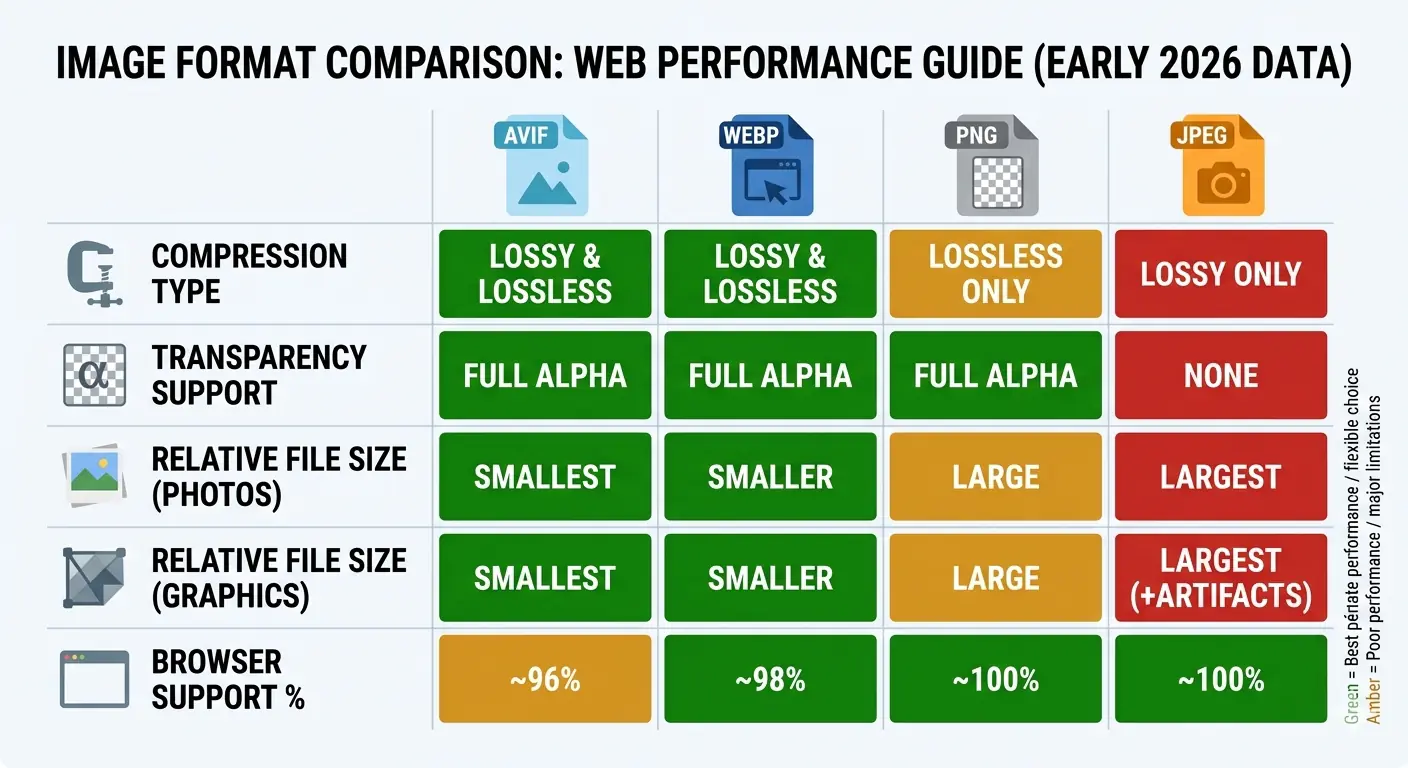
The table below summarises the practical differences between all four formats across the dimensions that matter most for web performance decisions.
| Format | Compression | Transparency | File Size (photos) | File Size (graphics) | Browser Support | Best For |
|---|---|---|---|---|---|---|
| JPEG | Lossy only | No | Baseline | Large | Universal | Legacy delivery, email, fallback |
| PNG | Lossless only | Yes | Very large | Small | Universal | Logos, icons, UI, screenshots |
| WebP | Lossy + lossless | Yes | 25–35% smaller than JPEG | 26% smaller than PNG | ~96% | Primary web delivery, all content types |
| AVIF | Lossy + lossless | Yes | 20–50% smaller than WebP | Comparable to lossless WebP | ~94% | Performance-critical images, LCP elements |
This image format comparison for web performance shows that no single format is the correct answer for every situation. The practical question is not which format to use across your entire site — it is which format to use for each category of image.
Which Image Format Loads Fastest?
The question of which image format loads fastest depends on the image content type and the delivery context.
For photographic content delivered to a modern browser: AVIF loads fastest because it produces the smallest files at equivalent quality. A 400KB JPEG that becomes 260KB in WebP becomes approximately 190KB in AVIF — a 52% reduction from the original. At a typical network speed of 10Mbps, this difference is 160ms in load time for a single image. Across multiple images on a page, the cumulative effect on LCP and total page weight is significant.
For graphical content (logos, icons, UI): Lossless WebP loads fastest among universally compatible formats, producing the same pixel-accurate output as PNG at 26% smaller file size. For audiences where AVIF support is confirmed, lossless AVIF achieves comparable results.
For legacy compatibility: JPEG loads on every device and every system. In contexts where AVIF and WebP cannot be guaranteed — email templates, external sharing, legacy applications — JPEG remains the fastest-loading format that works everywhere.
The practical answer for most websites in 2026 is to serve AVIF with a WebP fallback, using the HTML <picture> element. This delivers maximum compression to browsers that support AVIF while maintaining full compatibility through the WebP fallback.
The Best Image Format Strategy for 2026
The best image format for web in 2026 is not a single format — it is a layered strategy that matches format to content type and delivery context:
For photographs and complex images: Serve AVIF with a WebP fallback. Keep a JPEG as the final fallback for legacy compatibility.
For logos, icons, and UI elements: Use lossless WebP for live web delivery. Keep the PNG source file. JPEG is never appropriate for this content type.
For hero images and LCP candidates: Prioritise AVIF. The file size reduction translates directly into LCP improvement, which directly affects Core Web Vitals scoring and search rankings.
For email delivery: Use JPEG for photographs and PNG for graphics. WebP and AVIF support in email clients remains inconsistent in 2026.
For assets shared externally: Use JPEG or PNG depending on transparency requirements. External systems — partner intranets, design tools, document editors — cannot be assumed to support modern formats.
The HTML implementation for the layered approach:
<picture>
  <source srcset="image.avif" type="image/avif">
  <source srcset="image.webp" type="image/webp">
  <img src="image.jpg" alt="Descriptive alt text" width="800" height="600">
</picture>
This structure gives AVIF to browsers that support it, WebP to browsers that support it but not AVIF, and JPEG to everything else. Always include explicit width and height attributes on the <img> element to prevent Cumulative Layout Shift (CLS) during image load — a separate Core Web Vitals signal.
Converting your existing JPEG and PNG library to WebP and AVIF does not require server-side processing or specialist software. MeloTools converts images between all modern formats entirely in the browser — no file uploads, no server storage, no account required. Files never leave your device, making it safe for client assets and proprietary images.
Common Mistakes When Choosing Image Formats
Using PNG for photographs. Design tools default to PNG export, and those files frequently end up in CMS uploads unmodified. A photographic PNG is typically 3–5 times the file size of an equivalent WebP with no visible quality benefit. Always convert design-tool exports before uploading to a CMS.
Serving AVIF without a fallback. AVIF at 93–94% browser support means 6–7% of visitors receive a broken image without a fallback. Always implement AVIF via the <picture> element with a WebP or JPEG fallback, never as a standalone <img src="image.avif">.
Assuming the same quality setting works across formats. WebP at quality 80 and AVIF at quality 80 do not produce equivalent output. AVIF can typically be set lower — quality 60–70 — to achieve the same visual result at a smaller file size. Test visually at different quality settings before publishing.
Not converting hero images. Hero images are the most likely LCP element on a page. Leaving them as unoptimised JPEG or PNG while converting secondary images produces limited performance gains. Prioritise the largest, most visible images first.
For a deeper look at the image optimization steps developers most commonly overlook, the guide to top image optimization mistakes developers make covers the full pipeline from export to delivery.
Frequently Asked Questions
What is the best image format for websites in 2026?
WebP is the best default format for web delivery in 2026, offering 25–35% smaller files than JPEG and 26% smaller than PNG with universal browser support. For performance-critical images and LCP candidates, serve AVIF with a WebP fallback via the <picture> element to achieve up to 50% smaller files than JPEG at equivalent visual quality.
Is AVIF better than WebP for web performance?
AVIF achieves better compression than WebP — typically 20–50% smaller files at equivalent visual quality — making it the better choice for performance-critical images. WebP has slightly broader browser support and encodes faster, making it the better fallback format and the safer default for teams that cannot implement the full <picture> element approach.
Should I still use JPEG in 2026?
JPEG remains appropriate for email delivery, assets shared with external systems, and as the final fallback in <picture> elements. For live web delivery where browser control is possible, WebP or AVIF consistently outperform JPEG on file size with no perceptible quality reduction.
Can PNG be replaced by WebP entirely?
For live web delivery, lossless WebP replaces PNG functionally — it supports transparency, produces pixel-identical output, and is approximately 26% smaller. PNG remains the correct format for source files, design tool exports, and any asset delivered to systems where WebP support cannot be guaranteed.
How do I convert images to WebP or AVIF without software?
MeloTools converts images between all formats entirely in the browser. Drag and drop your JPEG or PNG file into the image converter, select your target format, and download the converted file. No uploads, no server processing, no account required — files never leave your device.
Does image format affect SEO?
Yes, directly. Image format determines file size, which affects page load speed, which influences Largest Contentful Paint (LCP) — a Google Core Web Vitals ranking signal. Converting hero images and LCP candidates from JPEG to WebP or AVIF is one of the most direct image-related actions available to improve search rankings. The guide to image optimization and Core Web Vitals covers the full technical picture.