
Image Compression for E-Commerce: Speed, SEO and Conversion Rate Guide


Complete Guide to Image Optimization for E-Commerce: Speed, SEO and Conversion Rates (2026)
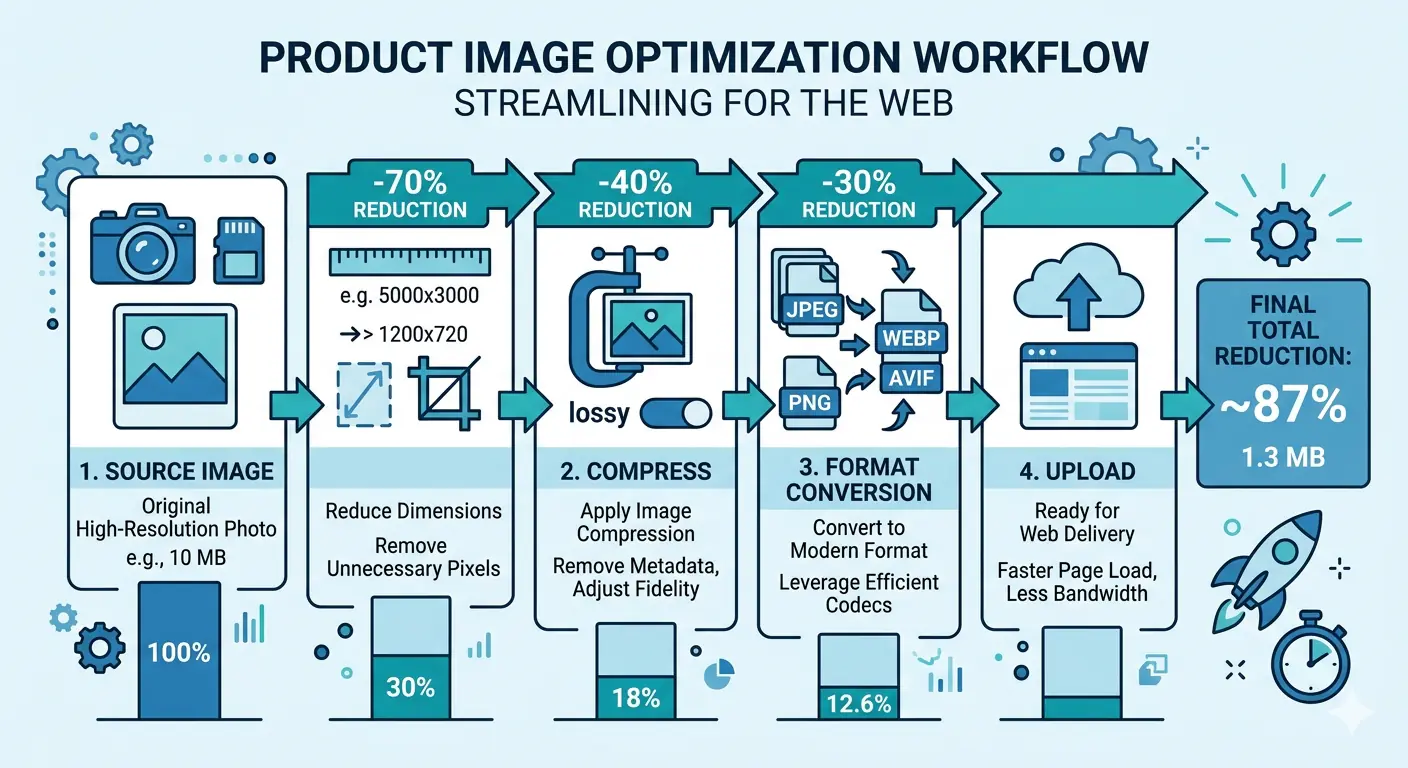 Every second counts in e-commerce. Research by Google found that as page load time increases from one second to three seconds, the probability of a mobile user bouncing increases by 32%. For an online store, that bounce is not just a missed page view: it is a lost sale.
Product images are the single largest contributor to page weight on most e-commerce stores. A typical product page with six high-resolution images, unoptimised and served as PNG or JPEG, commonly reaches 8–12 MB of total image payload. The same page with correctly optimised images using modern formats and appropriate compression delivers the same visual quality at under 1.5 MB.
This guide covers the full image optimization workflow for e-commerce: why it matters for speed, how it connects to search rankings, how it affects conversion rates, and how to implement it correctly whether you are running Shopify, WooCommerce, or a custom storefront.
TL;DR — Key Takeaways
- Unoptimised product images are the primary cause of slow e-commerce page load times and poor Core Web Vitals
- Image compression directly improves conversion rates: a 1-second load time improvement can increase conversions by 2–5%
- Product photo file size affects SEO through Largest Contentful Paint, the ranking signal Google uses to evaluate page speed
- WebP reduces product image file sizes by 25–35% over JPEG at the same visual quality, with no compatibility concerns in 2026
- Shopify and WooCommerce both require deliberate image optimization steps that are not handled automatically by default
- Descriptive file names and meaningful alt text are the two highest-impact image SEO signals for product pages
Why Image Optimization is Non-Negotiable for E-Commerce in 2026
E-commerce product pages are visually dense by design. Customers cannot touch or inspect products in person, so high-quality images build the confidence required to purchase. A fashion retailer typically shows 8–12 images per product. A furniture store may show 6–10 angles plus lifestyle photography. An electronics store combines hero shots with detail crops and usage context images.
Each of those images represents a file size cost. Multiply that cost across all products in a catalogue and across all pages a customer visits during a session, and the cumulative page weight is substantial.
The direct consequence is load time. On mobile networks, which account for the majority of e-commerce traffic globally, large unoptimised image files translate directly into seconds of waiting. And in e-commerce, seconds of waiting translate directly into abandoned sessions.
Image optimization for e-commerce addresses this without sacrificing the visual quality that drives customer confidence. The goal is not smaller images for their own sake. The goal is the smallest image file that preserves the visual fidelity a customer needs to convert. The difference between those two definitions is where optimization, rather than simply compression, begins.
How Product Image File Size Affects SEO Rankings
The relationship between product photo file size and SEO is direct, measurable, and increasingly significant.
Google uses Largest Contentful Paint as its primary metric for evaluating page speed as a ranking signal. LCP measures how long it takes for the largest visible element on the page to load. On virtually every product page, that element is the hero product image.
An unoptimised hero image at 1.5 MB served as PNG on a mobile connection typically produces an LCP score in the "Poor" range, above 4 seconds. The same image compressed to WebP at quality 82 and resized to display dimensions typically produces an LCP in the "Good" range, under 2.5 seconds. That single change moves a page from a speed signal that harms rankings to one that supports them.
The mechanism connecting image compression to Core Web Vitals scores, ranking signals, and measurable search traffic is covered in depth in the MeloTools guide to how image optimization improves Core Web Vitals.
Beyond page speed, images contribute to SEO through discoverability. Google Images drives 22% of all web searches. For product categories with strong visual appeal: clothing, furniture, home goods, food, and beauty products, image search is a significant acquisition channel that most stores leave under-optimised. Product photo file names and alt text are the primary signals Google uses to understand and rank product images in image search results.
A product image named IMG_4821.jpg tells Google nothing. The same image named womens-navy-linen-midi-dress-size-12.webp immediately communicates product type, colour, material, gender, style, and size. That information connects the image to purchase-intent searches in Google Images and Google Shopping.
The Direct Link Between Image Compression and Conversion Rate
The relationship between image compression and conversion rate operates through three distinct mechanisms.
Load speed. Deloitte research found that a 0.1-second improvement in mobile site speed increased conversion rates by 8% for retail sites. Image compression is the fastest way to achieve meaningful page weight reductions, making it the highest-ROI single optimization available for most e-commerce stores.
First impression quality. A page that feels fast signals competence and trust before a customer has read a single word of product copy. Conversely, a page that takes 5 seconds to render product images creates immediate doubt about the store's professionalism and reliability.
Visual quality preservation. This is where ecommerce product image optimization diverges from generic web image compression. Product images need to render crisply at zoom level, on retina displays, and across mobile and desktop screen widths. Over-compression that produces visible artefacts on product photography destroys customer confidence and directly reduces conversion rates.
The correct approach is not the most aggressive compression possible. It is the minimum compression required to meet your performance targets while preserving the visual quality that supports conversion. For product photography, this typically means WebP at quality 80–85 for standard display, with lossless compression reserved for detail crops, texture close-ups, and any images where fine grain or subtle colour differentiation is visible to customers.
Format Selection for E-Commerce Product Images
Choosing the right format is the single most impactful decision in ecommerce product image optimization. Format selection determines the file size ceiling before any compression settings are applied.
WebP is the correct default format for product images in 2026. It delivers 25–35% smaller files than JPEG at equivalent visual quality, supports transparency for product images on white or transparent backgrounds, and is supported by 96–97% of global web traffic. There is no compatibility reason to default to JPEG for new e-commerce image uploads.
AVIF delivers approximately 50% smaller files than JPEG at equivalent quality and is the superior format for hero images, lifestyle photography, and any content displayed on HDR screens. AVIF encoding is slower than WebP, which matters for large catalogues being batch-processed, but the file size advantage is significant on high-traffic product pages where every kilobyte affects load time at scale.
PNG remains appropriate for product images that require transparency, such as product shots on white backgrounds intended for composite layouts, icon elements, and any graphic asset where pixel-perfect edge sharpness is required. PNG files are substantially larger than WebP for photographic content and should not be used for product photography without transparency requirements.
A full comparison of formats across compression ratios, browser support, and specific e-commerce use cases is available in the MeloTools image format comparison guide.
E-Commerce Image Optimization by Platform
Shopify Image Optimization
Shopify handles some image optimisation automatically. When a product image is uploaded, Shopify serves it via their CDN and applies format negotiation, delivering WebP to browsers that support it. However, what Shopify does not do is resize images to display dimensions before serving, strip unnecessary EXIF metadata, or apply aggressive compression to reduce file sizes.
The practical result is that a 4000 × 4000 px product image uploaded to Shopify at 3.2 MB will be served via CDN, but it will still be delivered at a file size that produces slower load times than a pre-optimised equivalent.
Shopify image optimization best practice is to prepare images before uploading, not to rely on Shopify's pipeline to handle the entire optimisation:
- Resize images to the maximum display dimensions used in your theme before uploading. Most Shopify themes display product images at 800–1200 px width. Uploading a 4000 px source file wastes bandwidth relative to a correctly resized equivalent.
- Compress images using WebP format before uploading. Shopify will serve WebP natively, but the file size savings from format conversion at source compound with Shopify's CDN optimisation.
- Use descriptive file names before uploading. Shopify renames files in some cases, but descriptive names contribute to image SEO signals and should be set at source.
- Audit product images using Google PageSpeed Insights filtered to a representative product page. The "Serve images in next-gen formats" and "Properly size images" diagnostics identify specific files requiring attention.
WooCommerce Image Optimization
WooCommerce image optimization requires more deliberate intervention than Shopify because WooCommerce does not include CDN-based format negotiation or automatic image delivery optimisation by default. Images are stored and served directly from the hosting server in their uploaded format.
The WooCommerce image pipeline:
Upload-time optimisation is the most impactful intervention. Images should be resized and compressed using WebP format before uploading to the WooCommerce media library. This ensures every product image is served at the correct file size regardless of plugin or hosting configuration.
Plugin-based optimisation extends this with automatic compression for existing libraries. Plugins such as ShortPixel and Imagify integrate with the WordPress media library to compress images on upload and re-compress existing assets, serving WebP to supported browsers with JPEG fallback. Both operate via server-side or cloud API processing rather than browser-side compression.
Server-side configuration allows Apache or Nginx to serve WebP equivalents where they exist without modifying WordPress. This approach requires web server access and is more appropriate for custom hosting environments than managed WordPress installations.
Lazy loading is native to WordPress from version 5.5 onward and should be verified as active for WooCommerce product galleries. Lazy loading defers loading of off-screen product images until a customer scrolls toward them, reducing initial page weight on product pages with multiple images.
The cumulative impact of WooCommerce image optimisation across a product catalogue of several hundred items is significant. A store with 500 products, each with an average of 6 images, optimised from an average of 800 KB to 180 KB per image, reduces its image payload by over 1.8 GB across the full catalogue.
Product Image Technical Checklist
These specifications represent current best practice for ecommerce product image optimization:
| Specification | Recommendation |
|---|---|
| Format | WebP (primary), AVIF (hero images), PNG (transparency only) |
| Hero image maximum file size | Under 150 KB |
| Gallery image maximum file size | Under 100 KB |
| Thumbnail maximum file size | Under 30 KB |
| Maximum display width | Match theme maximum (typically 800–1200 px) |
| Compression quality (WebP, lossy) | 80–85 for product photography |
| Alt text | Descriptive, keyword-relevant, no keyword stuffing |
| File name format | product-descriptor-colour-size.webp (lowercase, hyphens) |
| Width and height attributes | Always declared to prevent Cumulative Layout Shift |
| Lazy loading | Applied to all below-the-fold product gallery images |
Resizing: The Step That Outperforms Compression Settings
One of the most consistent findings across image optimisation audits is that resizing images to display dimensions produces larger file size reductions than adjusting compression quality settings alone.
A product photograph at 4000 × 4000 px contains 16 million pixels. The same image displayed at 800 × 800 px on a product page contains 640,000 pixels: 4% of the original data. Even with aggressive WebP compression, the 4000 px source file carries unnecessary pixel data that inflates file size regardless of quality settings.
Resize images to the maximum dimensions they will be displayed at on your storefront before applying any compression. For retina display support, resize to 2× the CSS display size: if an image displays at 800 px CSS width on your theme, the source file should be 1600 px wide, not 4000 px.
This single workflow change, resizing before compressing, consistently reduces product image file sizes by 60–80% even before format conversion is applied.
The full guide to image compression without quality loss covers quality settings, resize targets, and the iterative compression workflow in depth.
Responsive Images for E-Commerce: Serving the Right Size to Every Device
Responsive image implementation ensures mobile visitors receive appropriately sized product images rather than desktop-scale files served to a 390 px screen.
The srcset attribute allows the browser to select the most appropriate image from a set of provided sizes based on the current viewport:
<img
  src="product-image-800w.webp"
  srcset="
    product-image-400w.webp 400w,
    product-image-800w.webp 800w,
    product-image-1200w.webp 1200w"
  sizes="(max-width: 480px) 100vw, (max-width: 768px) 50vw, 33vw"
  alt="Womens navy linen midi dress front view"
  width="800"
  height="1000"
  loading="lazy">
For e-commerce stores on Shopify, responsive image delivery is handled by the platform's image_url filter with size parameters. For WooCommerce, WordPress generates multiple image sizes automatically but serving the correct size to each device requires theme-level implementation or plugin support.
The practical impact of responsive images on mobile e-commerce performance is significant. A mobile visitor receiving a 1200 px image file on a 390 px viewport is downloading over 3× the pixels they can display, consuming mobile data bandwidth and extending load time with no visual benefit. Responsive implementation eliminates that overhead entirely.
The MeloTools guide on image optimization for developers covers srcset implementation, the <picture> element, and responsive image sizing patterns in full technical detail.
Alt Text and File Names: The SEO Layer of Product Image Optimization
Technical compression handles the performance dimension of ecommerce product image optimization. Alt text and file names handle the discoverability dimension.
File names are read by Google before the page HTML is processed. They are the first signal Google receives about what a product image depicts. Effective product image file names are descriptive and specific: black-leather-chelsea-boots-mens-size-10.webp outperforms boots-product-1.webp for every image SEO signal.
Alt text serves two functions: it describes the image to screen readers for accessibility, and it provides Google with contextual information about the image's content. Effective alt text for product images describes what a customer sees, incorporates natural keyword phrasing relevant to the product, and avoids generic phrases such as "product image" or keyword repetition that reads unnaturally.
A well-optimised alt text example: Womens navy linen midi dress, A-line cut, size 12, front view on white background outperforms both dress.jpg and a keyword-stuffed alternative that reads unnaturally.
Image sitemaps extend product image discoverability by explicitly listing product images for Google to crawl, particularly useful for images loaded via JavaScript or embedded in custom gallery components that crawlers may not reach via standard HTML parsing.
How to Audit Your E-Commerce Store's Image Performance
A practical audit of e-commerce image performance covers three tools:
Google PageSpeed Insights provides page-level analysis of image-related performance issues. Run it on your homepage, a representative category page, and your highest-traffic product page. The diagnostics to address first are: "Serve images in next-gen formats", "Properly size images", "Efficiently encode images", and "Defer offscreen images".
Chrome DevTools Network tab filtered to "Img" shows every image requested by a page, its file size, transfer size, and load time. Sort by size to identify the largest files requiring optimisation first.
HTTP Archive Web Almanac benchmarks show that the median e-commerce product page serves over 2 MB of images. If your product pages significantly exceed this, image optimisation is the highest-priority performance intervention available.
The audit process identifies which images require immediate attention, which format conversions produce the largest gains, and whether responsive image implementation is correctly serving appropriately sized files to mobile visitors.
Frequently Asked Questions
What is the ideal file size for e-commerce product images?
Hero product images should be under 150 KB when compressed using WebP at quality 80–85 and sized to your theme's maximum display width. Gallery images should be under 100 KB each, and thumbnails under 30 KB. These targets are achievable without visible quality loss and produce fast load times across mobile and desktop connections. Stores currently serving product images in the 500 KB to 2 MB range will see the largest performance and conversion improvements from optimisation.
Does Shopify automatically optimise product images?
Shopify serves images via CDN and converts them to WebP for supporting browsers. However, Shopify does not resize images to display dimensions, does not apply aggressive compression, and does not strip metadata at upload. Pre-optimising product images before uploading to Shopify: resizing to display dimensions, compressing using WebP, and removing EXIF data, produces significantly smaller file sizes than relying on Shopify's pipeline alone. This is particularly important for stores with large product catalogues where cumulative image payload affects site-wide performance.
How does image compression affect conversion rate in e-commerce?
Image compression affects conversion rate primarily through page load speed. Deloitte found that a 0.1-second improvement in mobile load speed increased conversions by 8% for retail sites. Google data shows that probability of bounce increases 32% as load time goes from 1 to 3 seconds. Because unoptimised product images are the primary cause of slow e-commerce load times, image compression is the single highest-ROI conversion rate optimization available to most stores. The key is achieving fast load times without visible quality loss: over-compressed product images that show artefacts reduce customer confidence and harm conversion rates.
Which image format should I use for WooCommerce product images?
WebP is the correct default format for WooCommerce product images in 2026. It delivers 25–35% smaller files than JPEG at equivalent visual quality and is supported by all major browsers. WordPress serves WebP natively and WooCommerce plugin-based optimisation tools handle WebP delivery with JPEG fallback for older browsers. For hero images and high-traffic product pages where maximum performance is the priority, AVIF delivers approximately 50% smaller files than JPEG and is worth implementing for browsers that support it, currently around 93% of global traffic.
Does resizing or compressing product images more aggressively hurt visual quality?
Resizing to the correct display dimensions does not harm visual quality: it removes pixels that the browser would never display anyway. Compression quality reduction does remove image data and will introduce visible artefacts if applied too aggressively. For product photography in e-commerce, WebP at quality 80 to 85 typically produces indistinguishable results from the uncompressed source at standard viewing size. Quality settings below 75 may introduce visible artefacts, particularly in fine texture areas and colour gradients common in product photography. Always review compressed product images at their intended display size on both desktop and mobile before deploying.
What is the impact of product image file size on Google rankings?
Product image file size affects Google rankings through Largest Contentful Paint, which measures how quickly the largest visible page element loads. On most product pages, the hero product image is the LCP element. Large, unoptimised product images produce poor LCP scores that directly harm search rankings. Optimising product images to load quickly moves LCP scores from the "Poor" range into "Good," improving the Core Web Vitals assessment that contributes to Google's ranking signals. Additionally, optimised product images with descriptive file names and meaningful alt text rank in Google Images, which drives 22% of all web searches and is a significant traffic channel for visual product categories.