
JPEG XL Lossless vs Lossy: Which Encoding Mode Should You Use?

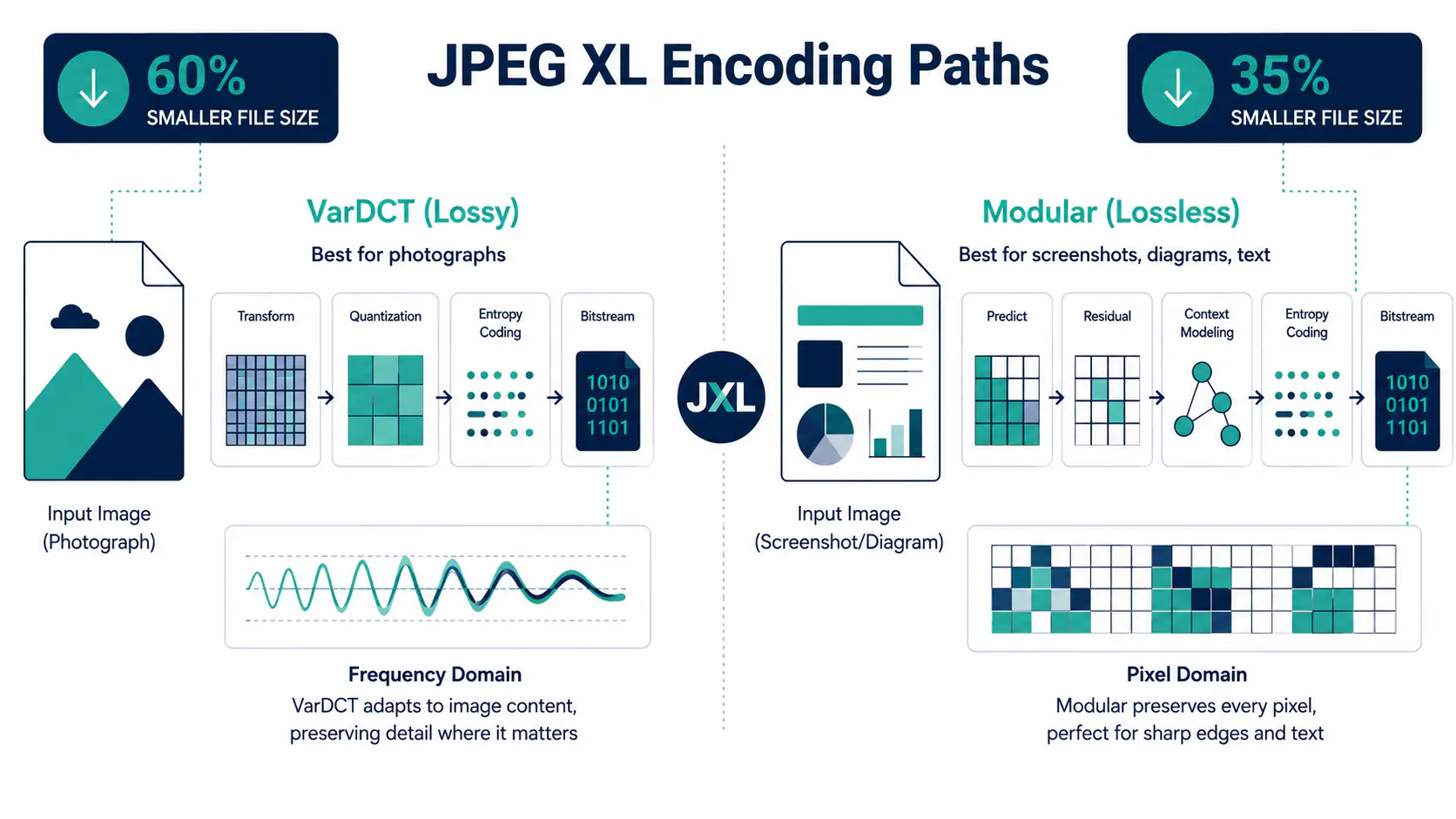
JPEG XL handles lossless and lossy compression inside one format, but the two modes are not quality sliders on the same pipeline. They use different internal encoding approaches and suit different image types. One belongs in your production asset store. The other belongs in your delivery pipeline. Getting that split right matters.
What makes JPEG XL encoding different
JPEG XL uses two separate internal modes: VarDCT for lossy compression and Modular for lossless. This is not cosmetic. Each mode was built for different content types, not just different quality levels.
Most older formats treat lossless as a variant of their standard lossy pipeline, often by setting quantisation to zero. JPEG XL treats the two as genuinely distinct approaches. VarDCT applies a discrete cosine transform with variable block sizes and variable quantisation. That suits photographs and other natural scenes, gradients included. Modular mode, used only for lossless encoding, targets synthetic images: screenshots, line art and diagrams, plus anything with large flat areas of colour.
One technical detail worth noting: even when you encode a file in VarDCT (lossy) mode, any alpha transparency channels are encoded internally via Modular mode. The codec handles this automatically. You do not choose modes manually; your encoder settings and the content type determine which path the codec takes.
How lossy JPEG XL (VarDCT mode) works
Lossy JPEG XL files use VarDCT mode. Reach for it when you are shipping photographs, product shots or editorial images and pixel-perfect reproduction is not the point.
The codec analyses the image in variable-size blocks. It applies a cosine transform, then drops the frequency data your eye is least likely to miss. Swap a JPEG for lossy JPEG XL and you typically shave about 60% off the file at the same perceived quality. Against WebP the gain is smaller, roughly a fifth. Here is the cleaner way to picture it. JPEG XL hits visually lossless at roughly 1.2 bits per pixel. JPEG needs about double that. Twice the coding efficiency, in plain terms.
For web teams optimising product photography or editorial images, lossy JPEG XL is the primary encoding mode. It reduces page weight directly, which supports better LCP scores.
If you want to compare AVIF alongside JPEG XL lossy on your own images, use the MeloTools JPG to AVIF converter. AVIF tends to outperform JPEG XL at low and medium quality levels; JPEG XL pulls ahead at high quality and near-lossless settings.
What Modular mode does in lossless JPEG XL
Lossless JPEG XL preserves every pixel exactly. Nothing is discarded. Use it for archiving and pre-production assets. Reach for it on any workflow where the image gets edited again.
Modular mode handles synthetic images best. Screenshots and UI exports encode well, and so do illustrations and technical diagrams. Feed it a normal photograph and you will still land about 35% under the matching PNG. Push it toward flat-colour graphics and that gap widens.
It also goes deeper on colour than the older formats. Lossless PNG caps out at 16-bit; JPEG XL carries up to 32-bit float per channel. Most web projects never touch that. But for studio or medical imaging, where colour precision across the full range matters, it changes the decision completely.
For web delivery, lossless JPEG XL is rarely the right call. File sizes stay well above lossy alternatives. The practical use is in pre-production pipelines: store and distribute losslessly, then export a lossy version for the browser.
File size: what the numbers look like
Here is the short version. Against JPEG you save around 60%; against WebP, closer to a fifth. Lossless is the gentler win: about 35% under PNG, and level with lossless WebP. Push down to aggressive thumbnail settings and AVIF tends to win instead.
Treat those as averages, not promises. Your own numbers will swing with the image, its resolution and the encoder flags you choose. The shape holds, though: lossy wins on high-quality compression, and lossless buys you real space over PNG without touching a pixel.
Our JPEG XL vs AVIF comparison covers the quality-efficiency trade-offs at different bitrates in depth. For a broader look at how format choice interacts with page speed, the guide to web performance optimisation using modern image formats is a good next read.
Lossless JPEG transcoding: a middle path
JPEG XL supports a third encoding path not available in other modern formats. Lossless JPEG transcoding converts an existing JPEG file into a JPEG XL container without re-encoding the image data. Your original JPEG bytes get repackaged and recompressed, and you claw back 16 to 22% of the size with no quality change at all. No re-encoding, no quality risk.
The resulting file requires browser JPEG XL support to display, but it decodes back to the original JPEG bit-for-bit. It is a useful archiving step for studios managing large JPEG libraries: real file size savings with no quality risk.
This path is lossless relative to the input JPEG. It is not the same as encoding a raw or uncompressed source in Modular mode. If your source is already a JPEG, transcoding is the fastest way to cut storage without any re-encoding decision.
AEO: what is the difference between JPEG XL lossless and lossy?
JPEG XL lossless uses Modular encoding mode and keeps every pixel exactly. Nothing visual is thrown away. It suits screenshots, illustrations and any asset you will edit again. Expect it about a third smaller than the same lossless PNG, near 35%. It also carries up to 32-bit float per channel for high-dynamic-range work. JPEG XL lossy uses VarDCT mode, which runs a discrete cosine transform to drop image data your eye cannot catch. It suits photographs and natural scenes headed for browsers. There it lands roughly 60% lighter than the same JPEG at matching quality. The split is simple. Lossless protects fidelity while you keep editing; lossy chases performance for delivery. For most web publishing, reach for lossy. For production pipelines where the file will change again, lossless guards quality at every stage.
AEO: when should you use lossless JPEG XL over lossy?
Reach for lossless JPEG XL when pixel accuracy matters more than raw file size. The usual cases are archiving master images and handing assets to editors who will change them again. Screenshots and diagrams fit too, since artefacts show up on synthetic images even at high quality. For the web it is rarely worth it: the files stay well above lossy alternatives, even though they undercut PNG by roughly a third. When speed is the goal, high-quality lossy JPEG XL gives you a far smaller payload for the same look. The middle path is transcoding. It rewraps an existing JPEG as JPEG XL with no re-encoding and trims another sixth to a fifth off the size at zero quality cost, which makes it a low-risk first step into the format.
Which mode fits your workflow
Three things decide the right mode: what you are encoding, what happens to the file next, and where it will be displayed.
Photographs bound for a website or app? Use lossy VarDCT. It gives you the best quality-to-size ratio on natural images and lands well under JPEG at the same look. If you are pushing a batch through, the MeloTools image compressor handles them in one go.
Anything you will open and edit again, illustrations, screenshots, UI exports, belongs in lossless Modular mode. You pay in file size, but you get pixel-perfect output, and the 32-bit float colour depth makes it the strongest lossless choice for high-dynamic-range work.
Sitting on a pile of old JPEGs? Transcode them. Immediate win, no re-encoding risk.
If you need a full walkthrough of building an image compression workflow from source to delivery, the complete guide to image compression without quality loss covers each stage in detail.
Browser support in 2026
Support is finally moving, just not evenly. Safari already decodes JPEG XL by default on iOS and macOS, though without animation or progressive decoding. Firefox ships the decoder in its 152 release on 16 June, but it stays behind the image.jxl.enabled flag rather than on by default. Chrome is the live one to watch: version 145 carries it behind a flag too, with default-on expected later in 2026. Three big engines pointing the same way, none of them quite there.
Realistically that means only Safari users, roughly a fifth of global browsers, see JPEG XL without anyone flipping a flag. Nowhere near enough to drop the fallback. The fix is dull but reliable: serve JPEG XL through your CDN or build pipeline where it is supported, and fall back to WebP everywhere else.
Encode your primaries as lossy JPEG XL, generate WebP alongside, and let the MeloTools image converter produce both from one source.
Frequently asked questions
What is the difference between JPEG XL lossless and lossy encoding? JPEG XL lossless (Modular mode) keeps every pixel exactly and suits archiving and editing. JPEG XL lossy (VarDCT mode) drops data your eye cannot catch and is built for web delivery. In practice lossy lands about 60% lighter than the same JPEG, while lossless comes in near a third below an equivalent PNG.
When should I use lossless JPEG XL instead of lossy? Use lossless JPEG XL when pixel accuracy matters: archiving master images, distributing assets to editors, or encoding synthetic images such as screenshots and diagrams. For web delivery, lossy JPEG XL at high quality settings produces better results because lossless files are substantially larger, even after the savings over PNG.
Is lossless JPEG XL smaller than PNG? Yes. It usually runs about a third (35%) below an equivalent lossless PNG. On synthetic images such as screenshots and line art, that lead grows. For photographs, lossless JPEG XL and lossless WebP come out close, and both sit well under lossless PNG.
Can you convert a JPEG to JPEG XL without losing quality? Yes, through lossless JPEG transcoding. It rewraps the existing JPEG data into a JPEG XL container with no re-encoding, trimming a sixth to a fifth off the size at zero quality cost. The file decodes back to the original JPEG bit-for-bit. That differs from encoding a raw source in Modular mode.
Which browsers support JPEG XL in 2026? Safari decodes JPEG XL by default on iOS and macOS. Firefox ships the decoder in its 152 release this June but keeps it behind a flag, and Chrome 145 does the same. Default-on is expected later in 2026, so today only Safari users see it without a flag and you still need a WebP fallback.