
Image Optimization Workflow for Frontend Developers

Introduction
Image optimization is still one of the easiest ways to break an otherwise well-built frontend application. In 2026, despite better browsers, smarter frameworks, and faster networks, images remain a top cause of slow pages, poor Core Web Vitals, and missed SEO opportunities. The problem is rarely knowledge. It’s almost always workflow.
Frontend developers don’t fail at image optimization because they don’t know what WebP or AVIF is. They fail because image handling is inconsistent, manual, and disconnected from the build process. This guide walks through a practical, repeatable image optimization workflow for frontend developers, based on how real teams ship real products.
Why Image Optimization Is Still a Frontend Problem
In most teams, images enter the system early but are optimized late, if at all. Designers export assets. Content teams upload files. Developers assume the framework or CDN will “handle it.” Somewhere along the way, performance suffers.
What makes this harder is that image optimization sits at the intersection of frontend optimization, SEO, performance, and tooling. If it’s not part of the workflow, it becomes an afterthought. And afterthoughts don’t survive deadlines.
As a Google Web Vitals engineer once put it:
“Most performance regressions don’t come from bad code. They come from assets that were never part of a controlled pipeline.”
That observation still holds true today.
What an Image Optimization Workflow Really Means
An image workflow is not a checklist. It’s a system.
For frontend developers, an image workflow defines:
- How images are created and accepted
- How formats and sizes are decided
- Where optimization happens
- How consistency is enforced across builds
Without a workflow, optimization decisions are made manually and inconsistently. With a workflow, images become predictable inputs, not performance risks.
This distinction matters because frontend applications scale. One landing page becomes ten. Ten blog posts become hundreds. Without a workflow, image optimization debt compounds quickly.
Where Most Image Workflows Break in Real Projects
Before building a better workflow, it helps to understand where things usually go wrong.
Manual Uploads and One-Off Decisions
A developer compresses images locally “just this once.” Another forgets. A third assumes the CDN will compress everything. This inconsistency leads directly to the kinds of image optimization mistakes developers keep repeating.
Over-Reliance on Format Conversion
Converting everything to WebP or AVIF helps, but it’s not enough. Large images are still large images. Without resizing and compression rules, format changes only solve part of the problem.
Ignoring Responsive Image Needs
Serving a 2400px-wide image to a mobile device is one of the most common frontend optimization failures. Responsive sizing is still skipped far too often.
Assuming CDNs Fix Everything
CDNs are powerful, but they don’t fix missing dimensions, poor source images, or bad filenames. They optimize delivery, not intent.
Core Components of a Frontend Image Optimization Workflow
A solid workflow is built from simple, enforceable rules.
Format Strategy
A modern workflow should define:
- Preferred formats (AVIF, WebP)
- Fallbacks for compatibility
- When legacy formats are acceptable
This decision should live in documentation or tooling, not in individual developer judgment.
Size and Resolution Rules
Define maximum dimensions for:
- Hero images
- Content images
- Thumbnails
This prevents oversized assets from entering the system in the first place. It also protects page speed, especially on mobile.
Compression Standards
Lossy vs lossless should not be a debate on every pull request. Pick defaults that balance quality and file size, then automate them.
Alt Text and Metadata Handling
Alt text is often treated as a content problem, but frontend workflows should support it structurally. Missing or generic alt text affects accessibility and Google Images visibility.
Build Tools and Image Handling
Modern build tools are powerful, but they’re not opinionated enough by default.
Bundlers and frameworks can:
- Transform formats
- Generate responsive image sets
- Inline or lazy-load assets
What they don’t do is decide your rules. That’s the developer’s responsibility.
Image handling should happen:
- During local development (feedback loop)
- During build time (enforcement)
- Before deployment (validation)
If optimization only happens at runtime, you’ve already lost control.
Performance and SEO Implications Developers Can’t Ignore
Image optimization decisions directly affect both users and search engines.
Largest Contentful Paint (LCP)
Hero images are often the LCP element. Oversized or poorly compressed images delay rendering and fail Core Web Vitals.
Cumulative Layout Shift (CLS)
Missing width and height attributes still cause layout shifts. This is a workflow issue, not a browser bug.
Google Images Indexing
Search engines rely on context, filenames, alt text, and surrounding content. Poor image workflows weaken visibility, even if the page itself ranks well.
If this sounds familiar, it overlaps heavily with common image optimization mistakes seen in SEO audits.
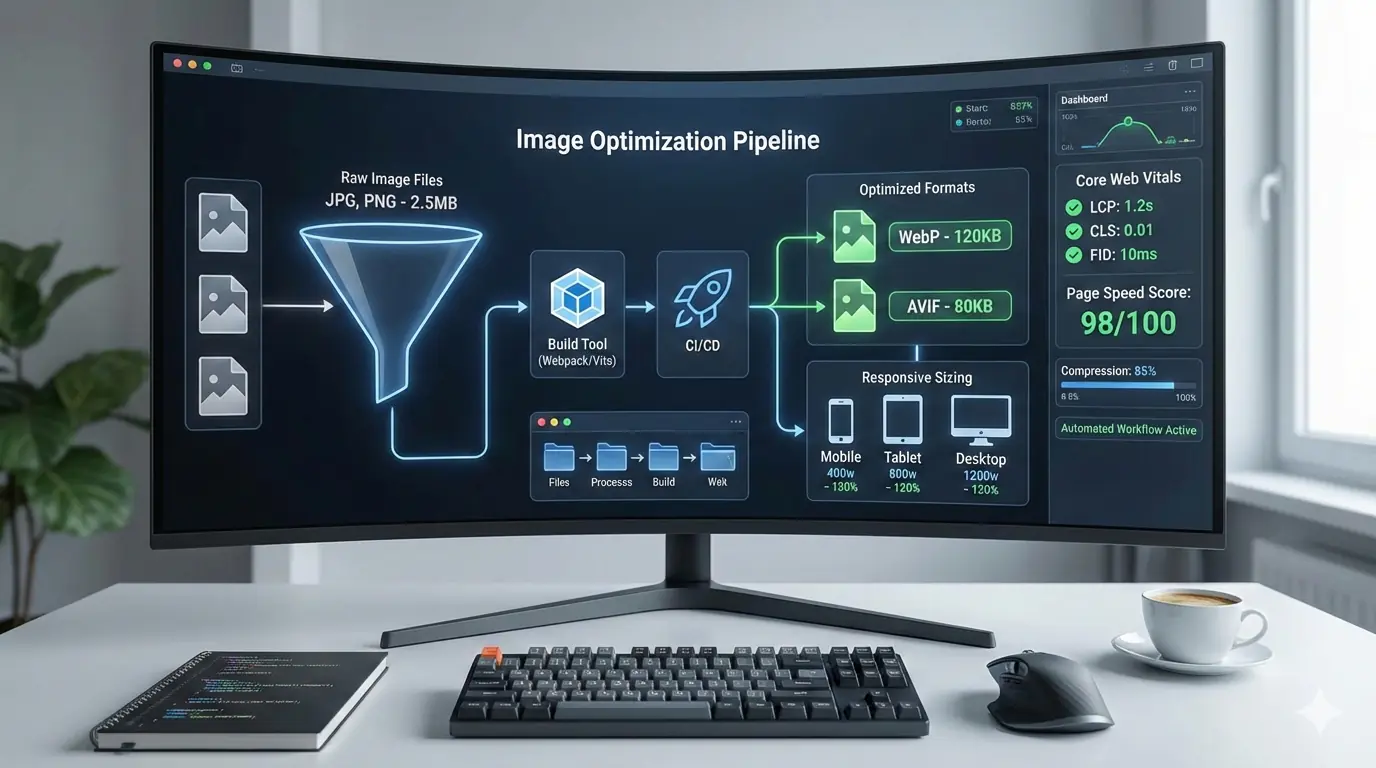
A Practical Image Optimization Workflow Example
Here’s what a repeatable workflow looks like in practice.
Step 1: Local Development
- Developers work with raw images
- Validation rules warn about size or format issues
Step 2: Build-Time Processing
- Images are resized, compressed, and converted automatically
- Responsive variants are generated
- Metadata is preserved or injected
Step 3: Deployment and Validation
- Performance budgets are enforced
- LCP and CLS metrics are checked
- Large regressions fail the build
This workflow removes subjective decisions and replaces them with predictable outcomes.
Where Tools Fit Without Taking Over
Tools should support workflows, not replace them.
Utilities like MeloTools are most effective when used as part of a defined pipeline:
- Predictable output formats
- SEO-safe compression
- Developer-friendly processing
This complements framework-level optimization and avoids privacy concerns that come with uploading assets unnecessarily. For teams that prioritize control, privacy-first image tools are often a better fit than opaque online converters.
How This Connects to the Bigger Optimization Picture
Image workflows don’t exist in isolation. They influence:
- Image sizing best practices for content-heavy pages
- AI-ready image optimization for emerging search systems
- Accessibility and user experience
Teams that standardize image handling early avoid rework later. Teams that don’t usually revisit the problem during performance firefighting.
Conclusion: Workflow Beats Skill Every Time
Most image optimization failures are not caused by lack of expertise. They’re caused by missing processes.
Frontend developers already understand formats, compression, and performance. What they need is a workflow that makes the right decisions by default. When image optimization becomes part of the build system, not a manual task, performance improves naturally.
The best teams don’t optimize images harder. They optimize them earlier, consistently, and automatically.